US Shipping Holiday Calendar
Which holidays affect your shipments depends on which carriers your 3PL uses. USPS closes on all 11 federal holidays. UPS closes for 7 (the Big 6 plus MLK Day). FedEx fully closes for 5 but runs modified service on several others. Select your carriers to see what matters for your operation.
| Holiday | Date | Day | USPS | UPS | FedEx | Category |
|---|---|---|---|---|---|---|
| New Year's Day | Jan 1 | Thursday | Closed | Closed | Closed | Big 6 |
| Martin Luther King Jr. Day | Jan 19 | Monday | Closed | Closed | Limited | Varies |
| Presidents' Day | Feb 16 | Monday | Closed | Open | Limited | Varies |
| Memorial Day | May 25 | Monday | Closed | Closed | Closed | Big 6 |
| Juneteenth | Jun 19 | Friday | Closed | Open | Open | Varies |
| Independence Day(observed) | Jul 3actual: Jul 4 | Friday | Closed | Closed | Closed | Big 6 |
| Labor Day | Sep 7 | Monday | Closed | Closed | Closed | Big 6 |
| Columbus Day | Oct 12 | Monday | Closed | Open | Limited | Varies |
| Veterans Day | Nov 11 | Wednesday | Closed | Open | Limited | Varies |
| Thanksgiving | Nov 26 | Thursday | Closed | Closed | Closed | Big 6 |
| Christmas Day | Dec 25 | Friday | Closed | Closed | Closed | Big 6 |
| Christmas Eve | Dec 24 | Thursday | Open | Limited | Limited | Edge case |
| New Year's Eve | Dec 31 | Thursday | Open | Limited | Limited | Edge case |
Subscribe to this calendar
Add non-shipping days to Google Calendar, Apple Calendar, or Outlook. Updates automatically.
https://www.3plpulse.com/api/calendar/fedex-ups-uspsIn Google Calendar: Settings > Add calendar > From URL. Paste the link above.
Use the API
JSON endpoint. Free, no auth. Use it in spreadsheets, scripts, or internal tools.
GET https://www.3plpulse.com/api/holidays?year=2026&carriers=usps,ups,fedexGoogle Sheets: =IMPORTDATA("...?format=csv") for a clean table. JSON for scripts and internal tools.
Use in Google Sheets
Pick your carriers and year, then copy the formulas into your spreadsheet. The first formula imports the holiday table. The second plugs it into your SLA calculations so NETWORKDAYS skips holidays automatically.
Step 1: Import holiday data (with formatted dates)
RecommendedPaste in cell A1 of a new tab called "Holidays". Uses QUERY to import the data and format dates as readable dates instead of serial numbers.
=QUERY(IMPORTDATA("https://www.3plpulse.com/api/holidays?year=2026&carriers=fedex,ups,usps&format=csv"), "SELECT * FORMAT Col2 'yyyy-mm-dd', Col3 'yyyy-mm-dd'")Step 2: Use in SLA calculations
In your orders sheet, use NETWORKDAYS with the observed dates from column C of your Holidays tab. This skips holidays automatically.
=NETWORKDAYS(A2, B2, Holidays!C2:C14)Step 3: Check if a date is a holiday
Returns TRUE if a date matches one of the imported holidays. Useful for conditional formatting or flagging orders.
=COUNTIF(Holidays!C:C, A2) > 0Simpler alternative (dates show as numbers)
If you prefer a simpler formula, use raw IMPORTDATA:
=IMPORTDATA("https://www.3plpulse.com/api/holidays?year=2026&carriers=fedex,ups,usps&format=csv")Dates will display as serial numbers (e.g., 46023 instead of 2026-01-01). To fix: select the date columns, go to Format > Number > Date. The values are correct for NETWORKDAYS either way.
Column C contains observed dates (adjusted for weekends). Use this column for SLA calculations, not column B (actual calendar dates).
Google Sheets caches IMPORTDATA for about 1 hour. To force refresh, append &_=1 to the URL and increment the number.
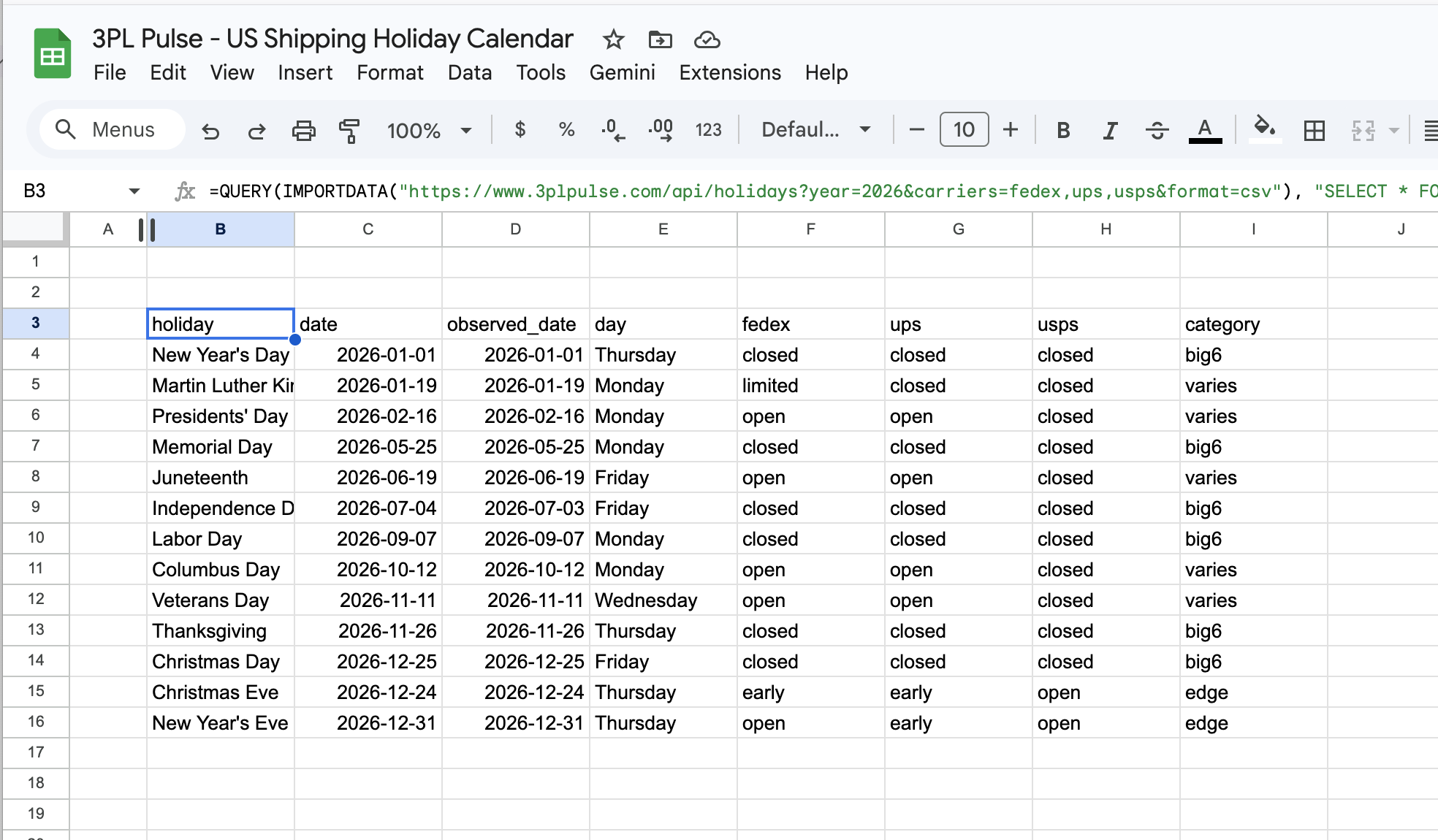
What it looks like in Google Sheets after pasting the Step 1 formula
Other ways to use this
Check before making delivery promises
If your 3PL uses USPS, MLK Day and Presidents' Day are non-shipping days even if the warehouse is open. Check here before telling a customer "ships Monday."
Add non-shipping days to your team calendar
Copy the .ics URL above and add it to Google Calendar (Settings > Add calendar > From URL). Non-shipping days show up automatically and update each year.
API Reference
Free, no auth, CORS-enabled. Use it in scripts, dashboards, or internal tools.
Holiday data (JSON)
GET https://www.3plpulse.com/api/holidays
| Param | Default | Description |
|---|---|---|
| year | current year | 2021 through 2100 |
| carriers | usps,ups,fedex | Comma-separated. Filter which carriers appear in the response. |
| format | json | json for programmatic use. csv for Google Sheets IMPORTDATA. |
Calendar feed (.ics)
GET https://www.3plpulse.com/api/calendar/ups-fedex.ics
Carrier names are dash-separated in the URL: usps, ups, fedex.
Combine any mix: /api/calendar/usps.ics, /api/calendar/usps-ups-fedex.ics.
Includes current year and next year. Subscribe in any calendar app that supports .ics URLs.
Example: curl
curl "https://www.3plpulse.com/api/holidays?year=2026&carriers=ups,fedex" About this data
Holiday dates are computed from US federal rules (5 U.S.C. § 6103), including observed date shifts for weekends. No hardcoded dates, correct for any year.
Carrier status is based on official published schedules: UPS Holiday Schedule, FedEx Holiday Schedule, USPS Holiday Closures. This covers the three carriers that handle the majority of US ecommerce shipments. Regional carriers (OnTrac, LSO, Spee-Dee, etc.) are not included and may follow different schedules.
Carriers can change their holiday policies. When in doubt, verify directly with your carrier or 3PL.
Related reading
- The 3PL Operating Calendar: What Your SLA Math Assumes (and Shouldn't): the full breakdown of Big 6 vs Varies holidays, carrier alignment, and what to ask your 3PL
- What Does 'Ship By Monday' Actually Mean?: why holidays are just one of five variables hiding inside every ship-by date
These tools and APIs are free and public. We'll do our best to keep them stable, but response shapes may evolve and uptime isn't guaranteed. For production SLA tracking with full reliability, use 3PL Pulse.
Have a suggestion or found an issue? Let us know.